Trace OpenAI Responses API calls with Maxim to gain full observability into your LLM interactions, including tool calls and structured outputs.

Prerequisites

Environment Variables

MAXIM_API_KEY=your_maxim_api_key
MAXIM_LOG_REPO_ID=your_log_repository_id
OPENAI_API_KEY=your_openai_api_key

Initialize Maxim Logger

import { Maxim } from "@maximai/maxim-js";

const maxim = new Maxim({ apiKey: process.env.MAXIM_API_KEY });
const logger = await maxim.logger({ id: process.env.MAXIM_LOG_REPO_ID });

if (!logger) {
  throw new Error("Failed to create logger");
}

Wrap OpenAI Client

Use MaximOpenAIClient to wrap your OpenAI client for automatic tracing:
import OpenAI from "openai";
import { MaximOpenAIClient } from "@maximai/maxim-js/openai";

const openai = new OpenAI({ apiKey: process.env.OPENAI_API_KEY });
const client = new MaximOpenAIClient(openai, logger);

Basic Usage

Make responses API requests using the wrapped client:
const response = await client.responses.create({
  model: "gpt-4o-mini",
  input: "What is the capital of France?",
});

console.log(response.output);

Tool Calling Example

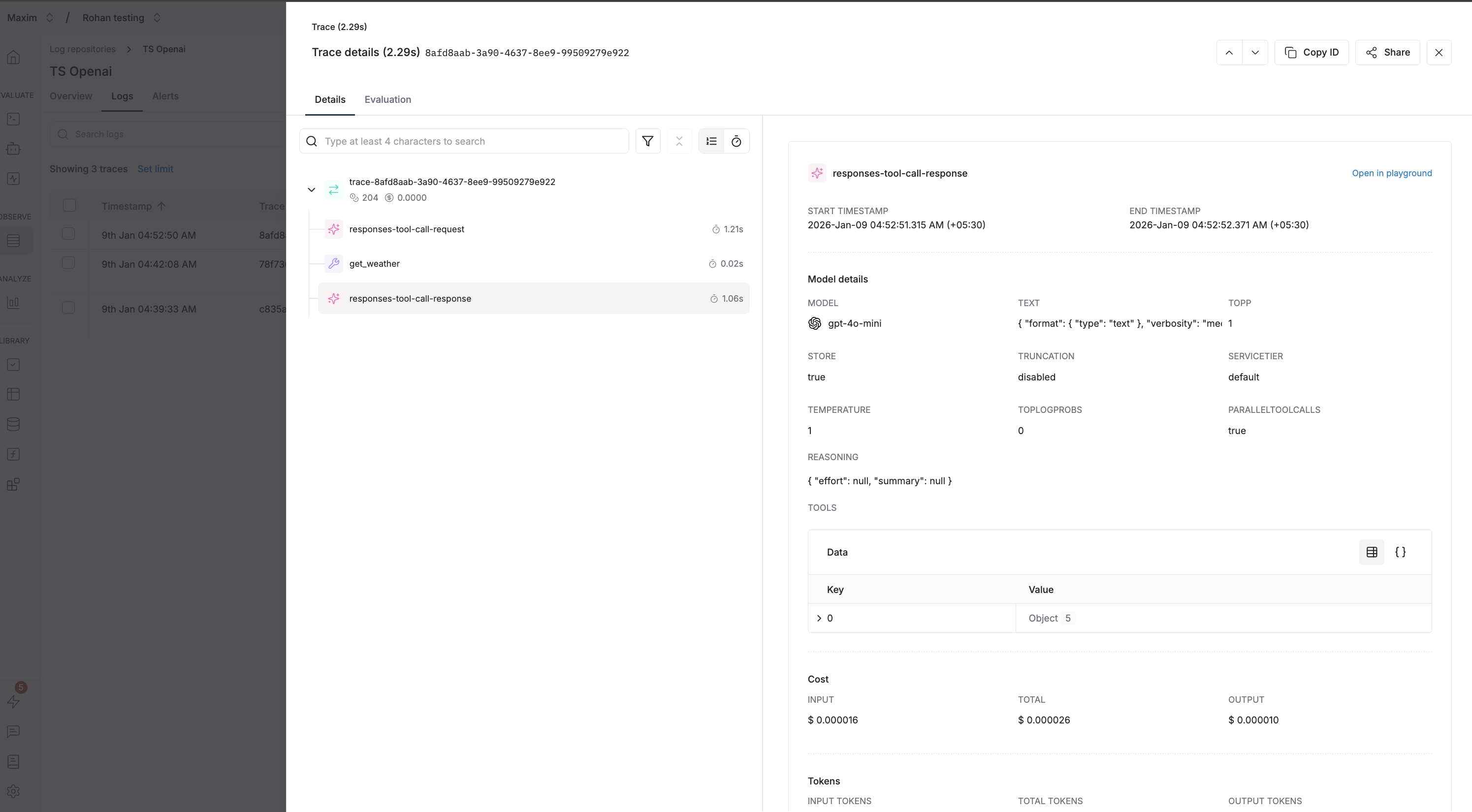
Here’s an example demonstrating tool calls with the Responses API:
import OpenAI from "openai";
import { Maxim } from "@maximai/maxim-js";
import { MaximOpenAIClient } from "@maximai/maxim-js/openai";

async function main() {
  const maxim = new Maxim({ apiKey: process.env.MAXIM_API_KEY });
  const logger = await maxim.logger({ id: process.env.MAXIM_LOG_REPO_ID });

  if (!logger) {
    throw new Error("Logger is not available");
  }

  const openai = new OpenAI({ apiKey: process.env.OPENAI_API_KEY });
  const client = new MaximOpenAIClient(openai, logger);

  // Define tools
  const tools: OpenAI.Responses.Tool[] = [
    {
      type: "function",
      name: "get_weather",
      description: "Get the current weather in a given location",
      strict: false,
      parameters: {
        type: "object",
        properties: {
          location: {
            type: "string",
            description: "The city and state, e.g. San Francisco, CA",
          },
          unit: {
            type: "string",
            enum: ["celsius", "fahrenheit"],
          },
        },
        required: ["location"],
      },
    },
  ];

  const response = await client.responses.create({
    model: "gpt-4o-mini",
    input: "What's the weather like in San Francisco?",
    tools: tools,
    tool_choice: "required",
  });

  console.log("Response:", JSON.stringify(response.output, null, 2));

  // Check for function calls in the output
  const functionCalls = response.output.filter(
    (item) => item.type === "function_call"
  );

  if (functionCalls.length > 0) {
    console.log("Function calls:", functionCalls);
  }

  await logger.cleanup();
  await maxim.cleanup();
}

main().catch(console.error);

Responses API vs Chat Completions

The Responses API is a newer, simpler interface compared to Chat Completions:
FeatureResponses APIChat Completions
Input formatSingle input stringArray of messages
Output formatArray of output itemsChoices with messages
Tool callsInline in output arrayNested in message
ConversationBuilt-in context managementManual message handling

Custom Headers for Tracing

You can pass custom headers to enrich your traces:
const response = await client.responses.create(
  {
    model: "gpt-4o-mini",
    input: "Hello!",
  },
  {
    headers: {
      "maxim-trace-id": "your-custom-trace-id",
      "maxim-session-id": "user-session-123",
      "maxim-trace-tags": JSON.stringify({ env: "production" }),
    },
  }
);

Available Header Options

HeaderTypeDescription
maxim-trace-idstringLink this generation to an existing trace
maxim-session-idstringLink the parent trace to an existing session
maxim-trace-tagsstring (JSON)Custom tags for the trace (e.g., '{"env": "prod"}')
maxim-generation-namestringCustom name for the generation in the dashboard

Streaming Support

The wrapped client supports streaming responses:
const stream = await client.responses.create({
  model: "gpt-4o-mini",
  input: "Write a short poem about programming",
  stream: true,
});

for await (const event of stream) {
  if (event.type === "response.output_text.delta") {
    process.stdout.write(event.delta || "");
  }
}

Cleanup

Always clean up resources when done:
await logger.cleanup();
await maxim.cleanup();

What gets logged to Maxim

  • Request Details: Model name, parameters, and all other settings
  • Message History: Complete conversation history including user messages and assistant responses
  • Response Content: Full assistant responses and metadata
  • Usage Statistics: Input tokens, output tokens, total tokens consumed
  • Error Handling: Any errors that occur during the request
Responses API Trace

Resources